
A carousel post (or album) is an Instagram post that contains multiple photos or videos (up to 10 slides) that users can swipe through.
Instagram Carousel Downloader
Download all public images and videos from carousel posts.
How do I download an Instagram carousel album using a link?
To download multi-slide Instagram posts, copy the carousel link, paste it into Grabix, and download all photos and videos in full quality.
1
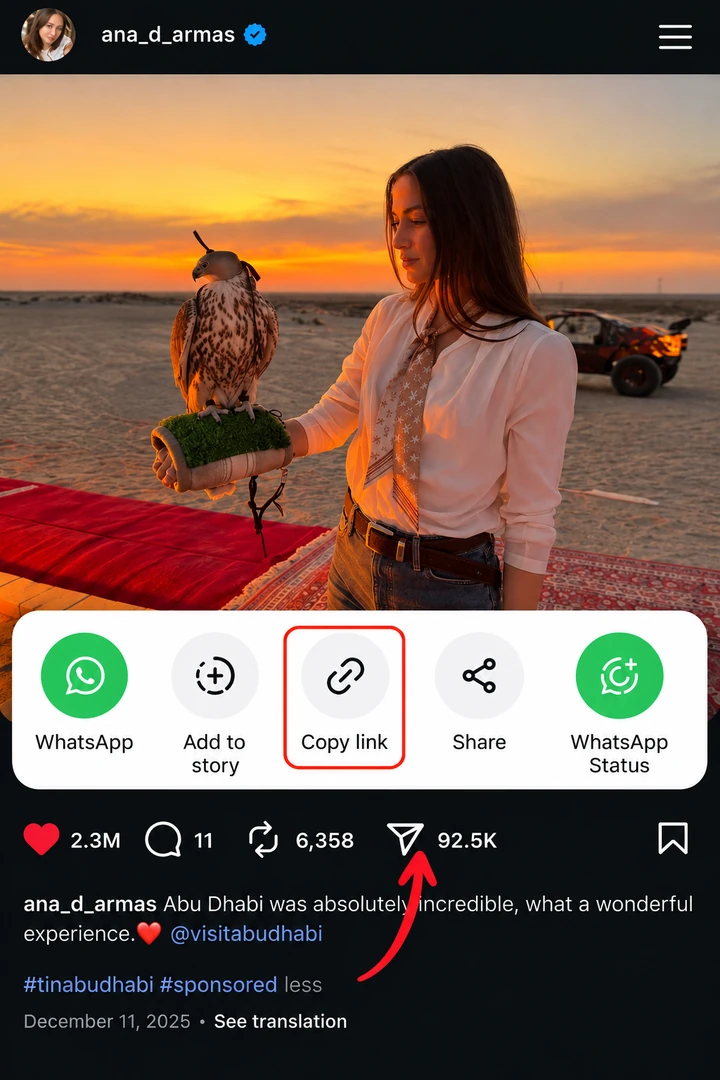
Copy the album link
Navigate to the multi-slide Instagram post and tap "Copy link" from Share.
2
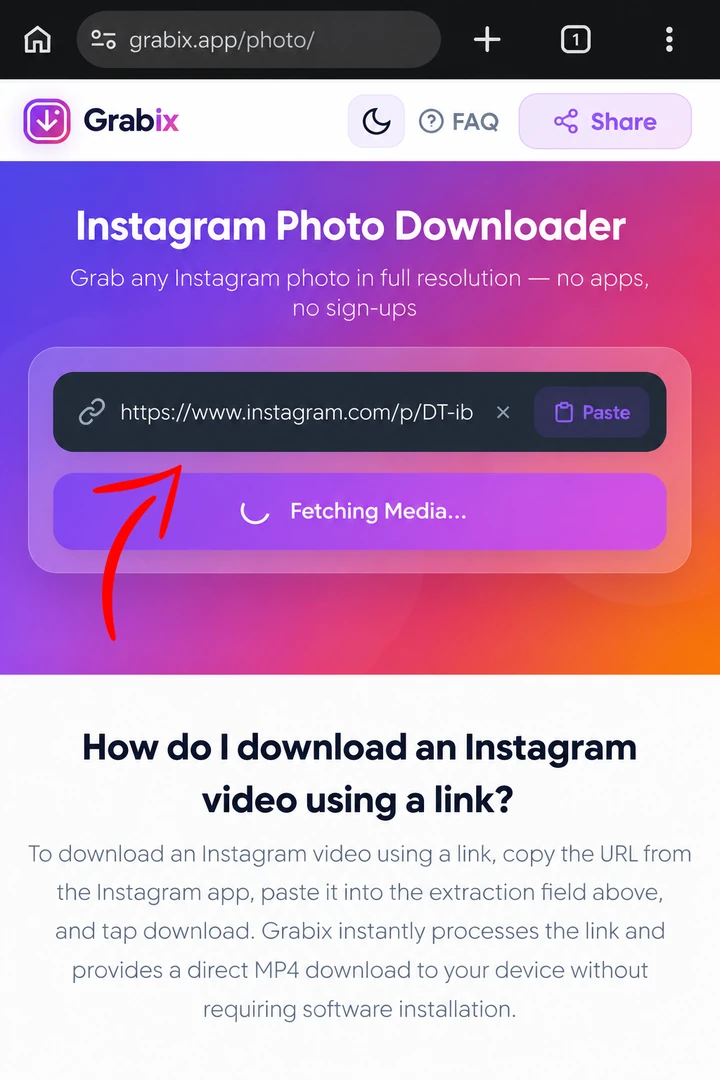
Paste into Carousel Downloader
Paste the link into Grabix to load all slides simultaneously.
3
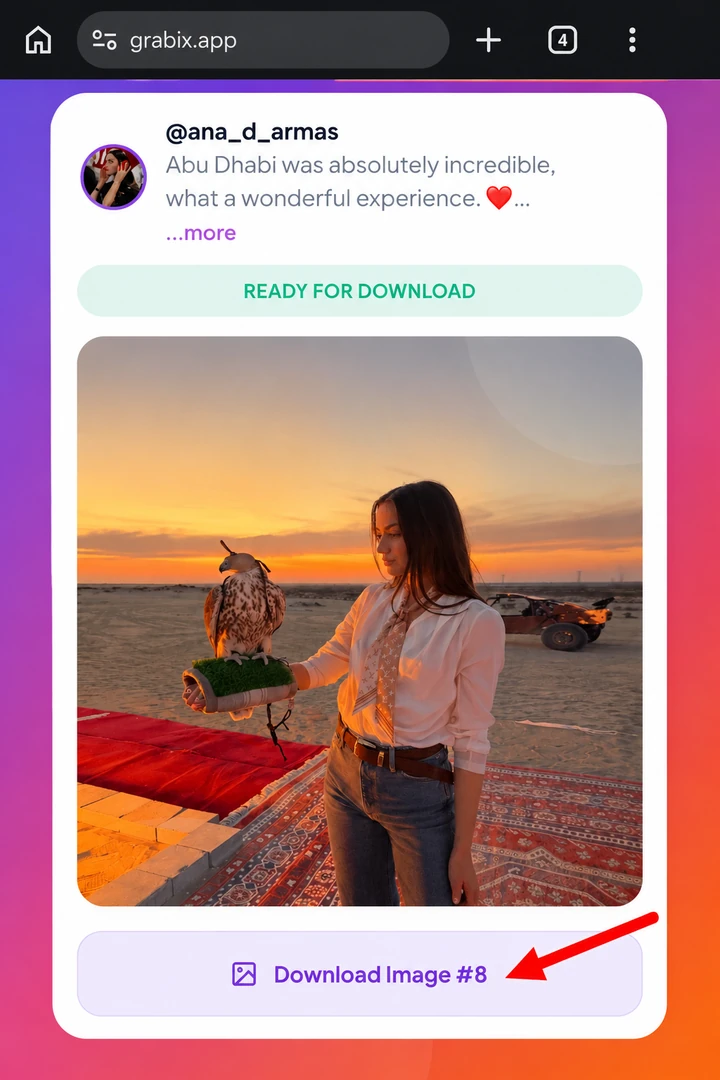
Download all photos & videos
Download all carousel slides in full resolution with original quality.
What Can You Download?
Grabix supports downloading every public media type from Instagram in original quality.
Video Downloader
Save single Instagram videos from public posts in high-definition MP4 format. Perfect for watching offline or sharing.
Photo Downloader
Download Instagram images in their original, uncompressed JPG resolution directly to your camera roll or desktop.
Reels Downloader
Easily download Instagram Reels to keep your favorite short-form videos forever. Audio is always preserved in high quality.
Highlights Downloader
Save story highlights from any public profile permanently in full HD quality so you never lose them when creators update their profiles.
Carousel Downloader
Paste a link to a carousel (album) post and download all included photos and videos simultaneously.
Story Downloader
Download available public Instagram Stories before they disappear after 24 hours.
Why Choose Grabix?
We prioritize speed, security, and a frictionless user experience.
Lightning Fast
Our optimized backend servers process links instantly, delivering maximum download speeds regardless of your location.
Private & Secure
We do not require you to log in to Instagram, and we do not log or store any of your downloaded files on our servers.
Cross-Platform Support
Grabix works flawlessly on Chrome, Safari, Firefox, and Edge across iOS, Android, Windows, and macOS devices.
Frequently Asked Questions
Common questions about using our Instagram downloader tool.
Paste the carousel post URL into Grabix and click Download. Grabix extracts every individual photo and video slide so you can choose which ones to save in full resolution.
Yes. Mixed carousel albums containing both MP4 videos and JPG images are fully supported, and each file is provided in its native format and original resolution.
No, you can download all available slides in the carousel at full original quality with zero restrictions.
No. Grabix does not bundle carousel posts into ZIP archives. Instead, Grabix extracts each photo and video slide individually so you can preview and download exactly the slides you want in full quality.
Yes. Grabix retrieves the maximum resolution available for every slide—full HD MP4 for videos and uncompressed 1080p JPG for photos.
Navigate to the carousel post, tap the Share icon (paper airplane) below the post, and tap "Copy link". Paste it into the Grabix Carousel Downloader input field.
Yes. Grabix is optimized for mobile browsers on both iOS and Android. You can download each carousel slide directly to your phone's photo gallery.
No. Every image and video downloaded from a carousel post remains 100% original and watermark-free.
No. Grabix respects user privacy and only downloads carousel posts from public Instagram profiles.